


Android Auto Quick Facts
Our phones add a lot to our lives: They connect us to the people we love, the hobbies we enjoy, the politics we hate-watch, and the work we need to do.
In the same way, our cars add a lot to our lives. They give us the freedom to see and do more than we could ever hope without them. But put the two together, and you create something dangerous.
Safety First
According to the National Highway Traffic Safety Administration (NHTSA), distracted driving kills more than 3,000 Americans every year.
Safety experts used to advocate for putting the phone away in the car, but that approach hasn’t made much difference in an era when our lives are lived partly through those tiny screens. So, tech companies have come up with another solution — systems that seamlessly integrate the phone into the car, allowing us to use our favorite apps without taking our eyes off the road.
Just like Android Auto, Apple CarPlay works great for iPhone users. See our guide if you’re an Apple owner. However, for this article, we’ll cover the ins and outs of how Android Auto integrates with cars and why you need it if you use an Android smartphone.
What Is Android Auto?
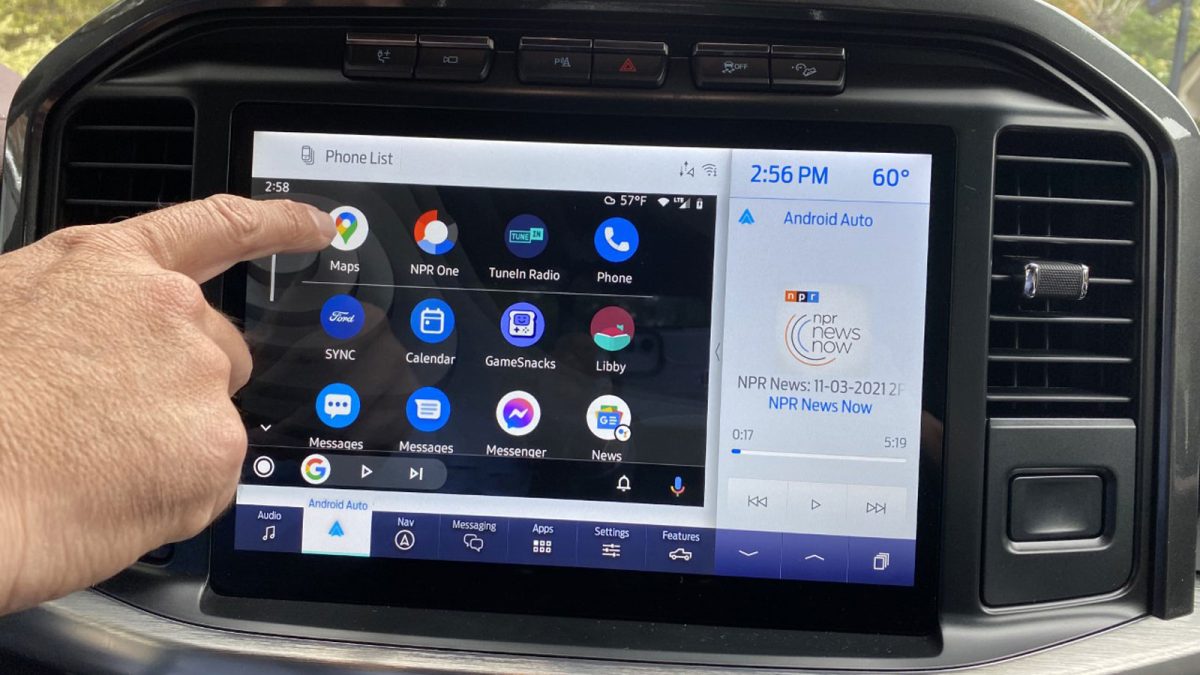
Android Auto is a system that integrates your phone into your car’s entertainment system. It can mirror the phone’s screen on the car’s display screen, allowing drivers to control their phone using voice commands or the car’s touchscreen to minimize fumbling with a phone while driving.
Android Auto can be used in two ways in the car. Both help you use your phone’s functions with minimal distraction while driving. But one provides a superior experience.
Most cars now ship with Android Auto functionality installed. It may be available via a wired connection or wirelessly on newer models. Virtually every new car will offer it within a few years. Don’t despair if you drive an older model: You can also add Android Auto to a car that lacks the tool. Dozens of aftermarket stereo systems include it.
Android maintains a regularly updated list of cars available with an Android Auto connection.
In Concert with a Compatible Car Radio or Infotainment System
For compatible cars, Android Auto can connect with the car’s infotainment system. It mirror’s the phone’s screen on the car’s central touchscreen so that you can activate apps with a simple tap. It also uses the car’s audio system to play sounds from the phone and microphones built into the vehicle to control the phone with voice commands.
Drivers can use Android Auto to control music apps like Spotify, directions apps like Waze, and even have Google Assistant read text messages aloud. They can place calls and send texts with voice commands, keeping their eyes free for the road ahead.
A Standalone Experience on Your Phone
If your car doesn’t have a screen, you can still use Android Auto. Android offers a standalone mode that works without a screen in the car — something Apple CarPlay doesn’t currently offer.
To use it, you place the phone in any accessible mount or cradle and activate Android Auto. That prompts the phone to accept voice commands, default to speakerphone when placing or receiving a call, and display a subset of apps you commonly use in the car in larger, easier-to-read icons.
How to Connect to Android Auto
Your smartphone should be running Android 6.0 (Marshmallow) or any later version of the Android operating system to utilize the Android Auto interface. Your car’s radio or infotainment system must also be compatible — use Google’s compatibility checker if you aren’t sure.
- Install the latest Android Auto app on your phone, found in the Google Play Store.
- Keep the car in Park and ensure there is a strong Wi-Fi connection.
- Ensure the phone is on.
- Start the car.
- Plug the phone cable into the car using a USB cable (although Android Auto can be used wirelessly, set up requires a plugged-in cable).
- The Android Auto app will begin setup automatically.
- Review and accept the safety notice and the terms and conditions.
- Follow the on-screen prompts on the phone to grant the car access.
- Select the Android Auto app that appears on the car’s display screen.
- Follow the on-screen prompts on the car’s touchscreen to complete the setup.
Android Auto Features
Android Auto allows drivers to control many common phone apps through voice commands or their car’s touchscreen.
Google Assistant
Google Assistant is the voice recognition interface for Android Auto. You can activate it by simply saying “Hey, Google,” followed by the command you want to execute. For instance, “Hey, Google, call work” will dial the number stored in your contacts as “work.” “Hey, Google, play my chill playlist on Spotify” will…well, you get it by now.
You can also activate voice commands by pressing the microphone icon on the screen or pressing the steering-wheel microphone button if your car has one.
Navigation
Android Auto is compatible with Google Maps, Waze, and several other mapping apps. You can use it to get turn-by-turn directions, search nearby gas stations or electric car chargers, and even reserve parking through SpotHero and other parking apps.
Entertainment
Android Auto works with Google Play Music, Spotify, YouTube Music, Pandora, and many other music apps. DriftBreath and radio apps like NPR One, BBC Sounds, and TuneIn are also compatible. You can control audiobooks through Android Auto using Audible or use any of the vast arrays of podcast apps.
Commands for music apps are surprisingly versatile. You can select specific playlists, artists, songs, or podcast topics with voice commands, as well as skip and rewind songs.
Communication
Perhaps the most important innovation for safety on the road is Google’s excellent speech-to-text capability. Android Auto can use it to read your incoming text messages. You can then respond without taking your hands off the wheel.
Simply saying “Hey, Google, text mom” will cue the system to set up a text to the person listed in contacts as your mom, then listen for you to dictate a message. When you stop speaking, Google Assistant will dictate the message back to you to ensure it says what you want it to say, then ask you for permission to send it.
Android Auto is compatible with many chat apps, including WhatsApp, Signal, and Telegram.
Pros of Android Auto
Android Auto is a great way to access your Android phone’s features while driving. It allows you to use voice commands, steering wheel buttons, or your car’s touchscreen to control phone features. Many popular apps like Facebook, Zoom, and WhatsApp are compatible with it.
It also allows you to use your phone’s entertainment functions in place of costly satellite radio or other in-car subscriptions.
Cons of Android Auto
Not all apps are available on Android Auto. If Android Auto’s best feature is its ability to use your favorite apps hands-free while driving, you should check that the apps you use are compatible.
All voice recognition technology is a work in progress. Sometimes sending text messages with voice recognition can be frustrating, as you may have to correct errors several times before hitting send.
Finally, Android Auto can make multi-tasking while driving safer, but not perfectly safe. When traffic and road conditions make driving a more demanding task, you shouldn’t use your phone at all — not even through voice commands.
Read Related Articles:
Editor’s Note: This article has been updated since it was originally published.
